Know Dad is okay, wherever you live.
Lasna connects to the Apple Watch your dad already wears.
You see how his day is going from your own phone.
If he falls and does not answer his watch, or is not up by his usual time, your whole family hears at once.
Lasna works the same for Mom, a grandparent or anyone who lives alone. Looking after Mom?
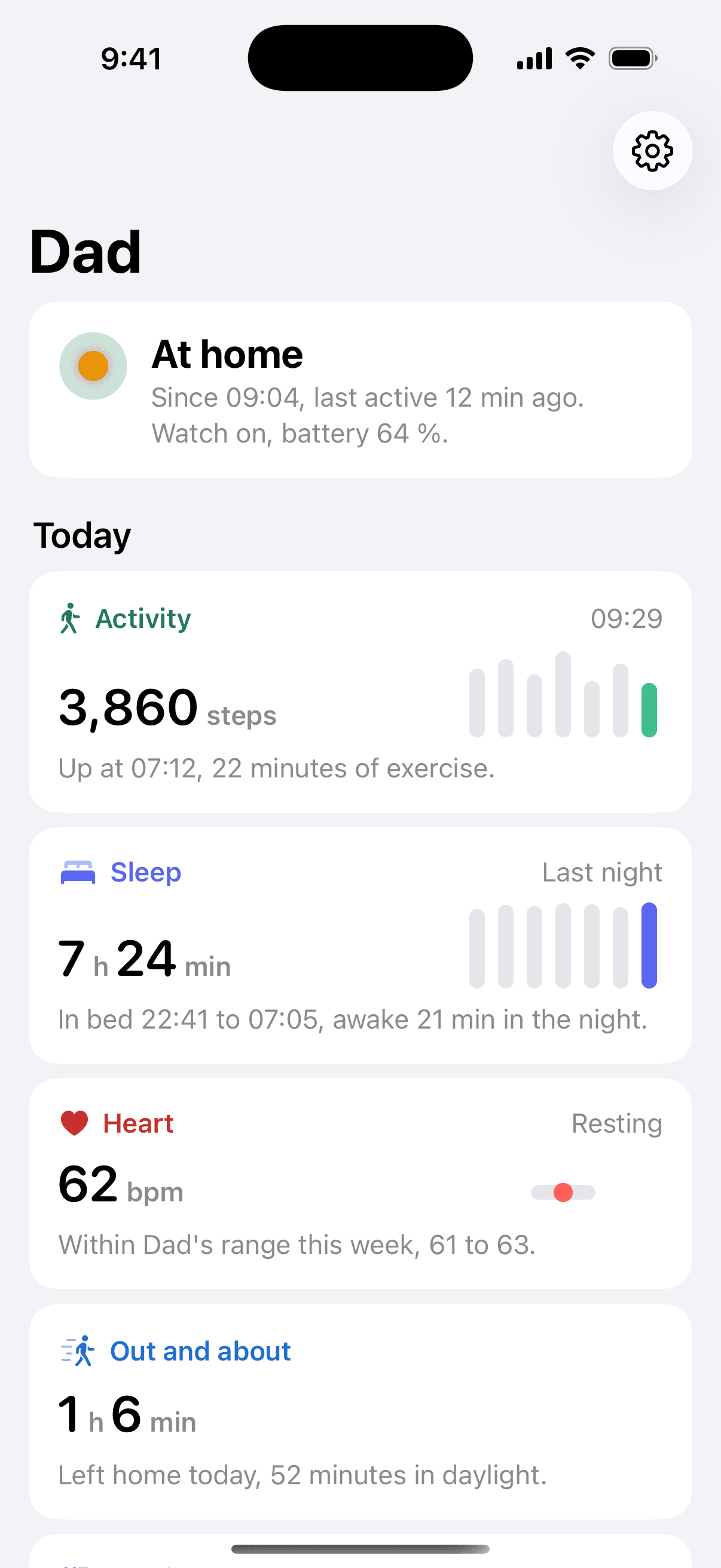
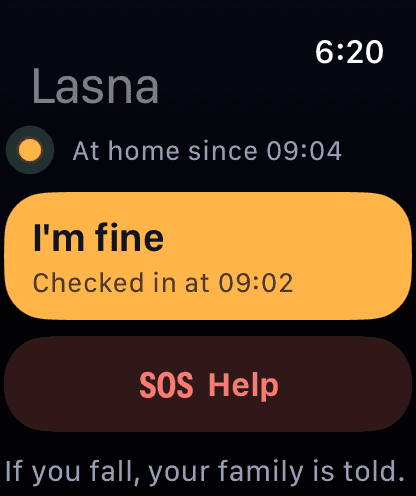
Follow Dad's day from your own phone.
These are real screens from the Lasna app. Pick a moment to see what Jane sees in London.
See who is awake right now.
Jane lives in London. John lives in Austin. Ana lives in Singapore.
Lasna sends an urgent alert to all three at once, day or night. It holds gentle notes until each person's morning.
- --:--Dad in Columbus, Ohio
- --:--Jane in London
- --:--John in Austin
- --:--Ana in Singapore
Hear about a bad morning before you call.
Lasna learns when Dad gets up, how long he naps and how far he walks. This takes about two weeks.
After that, Lasna compares each day with his own normal. A late riser gets no alert at eight. An early riser who is still at nine does.
Get urgent alerts for real emergencies
Each alert waits for a clear sign that something is wrong. Then Lasna alerts and texts everyone Dad allows. It calls the family after three minutes if nobody responds. After ten minutes it shows everyone the local emergency number.
- Hard fall
- His watch detects a hard fall and asks if he is OK. Lasna alerts you when he does not answer within about a minute or says he fell. If he taps I'm OK, you get one calm note instead.
- Fall away from home
- Lasna adds the place where he fell.
- Help pressed
- Dad presses Help on his watch or phone.
- Not up by his usual time
- His watch and phone see no movement well past his usual wake-up time.
- Missed check-in
- Dad skips the daily I'm fine that he chose.
- Heart notifications
- His Apple Watch flags a high, low or irregular heart rhythm.
- Lost contact
- Lasna's servers stop hearing from his watch and phone.
Get notices within hours
Lasna sends one notification. It does not escalate.
- Still for longer than usual
- Lasna compares the quiet spell with his own quiet spells at that hour.
- Out longer than usual
- Dad stays away from home and garden past his normal outings.
- Left home at night
- Dad leaves home during his night hours.
- Watch off or nearly flat
- Dad leaves his watch off during the day or low on battery at night.
See trends over days
Lasna writes them into his feed and the weekly note.
- A restless night
- Lasna compares his sleep with his last 28 nights.
- May be coming down with something
- His wrist temperature, resting heart rate and breathing rate rise together.
- Walking more slowly
- His walking speed drops over two weeks against the six weeks before.
- A quieter week
- Dad takes fewer steps and goes out less than usual.
Lasna is a family awareness app. It is not a medical device. It reports what his watch and phone saw. It does not diagnose.
Apple Watch fall detection and Emergency SOS keep working on their own.
Get one calm note after a restless night.
His watch records his sleep. Lasna compares each night with his last 28 nights.
You hear about a night only when it looks clearly unlike him. The note arrives after he gets up.
- 122:40Asleep
- 201:30Up for 12 minutes, kitchen
- 304:10Up for 32 minutes
- 407:32Up for the day
Lasna, Wednesday 08:10
Dad had a restless night
Dad was awake 1 h 20 min in the night. He is usually awake for 15 minutes. He got up twice for longer spells, at 1:30 and 4:10. He started his day at 07:32, his usual time.
Lasna sends this note once. It never rings and never escalates.
Lasna, Wednesday 10:00
Dad may be coming down with something
- Wrist temperature
- +0.6°C
- Resting heart rate
- +5bpm
- Breathing rate
- +1.6/min
Lasna compares each number with his own 28-night normal. All three rose together overnight. That is a good reason to call and ask how he feels.
Lasna does not diagnose. Sleep notes need Dad to wear his watch to bed with sleep tracking on.
Dad chooses what each of you sees.
You set up Lasna with Dad, on his own phone. He decides what each person can see.
He can see who looked at his day. Every change he makes reaches the family at once.
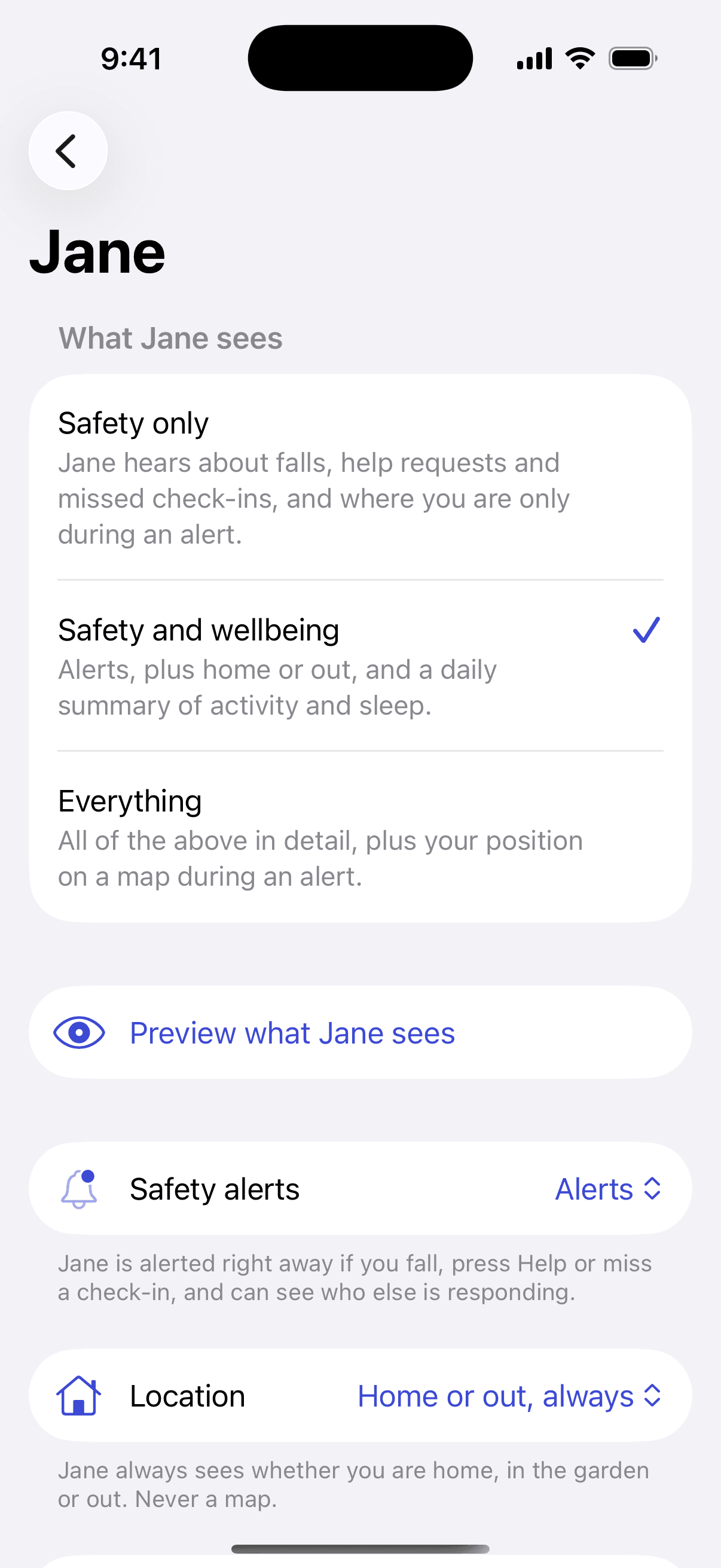
Dad picks a level for each person
He chooses Safety only, Safety and wellbeing, or Everything. He can fine-tune each category, such as location.
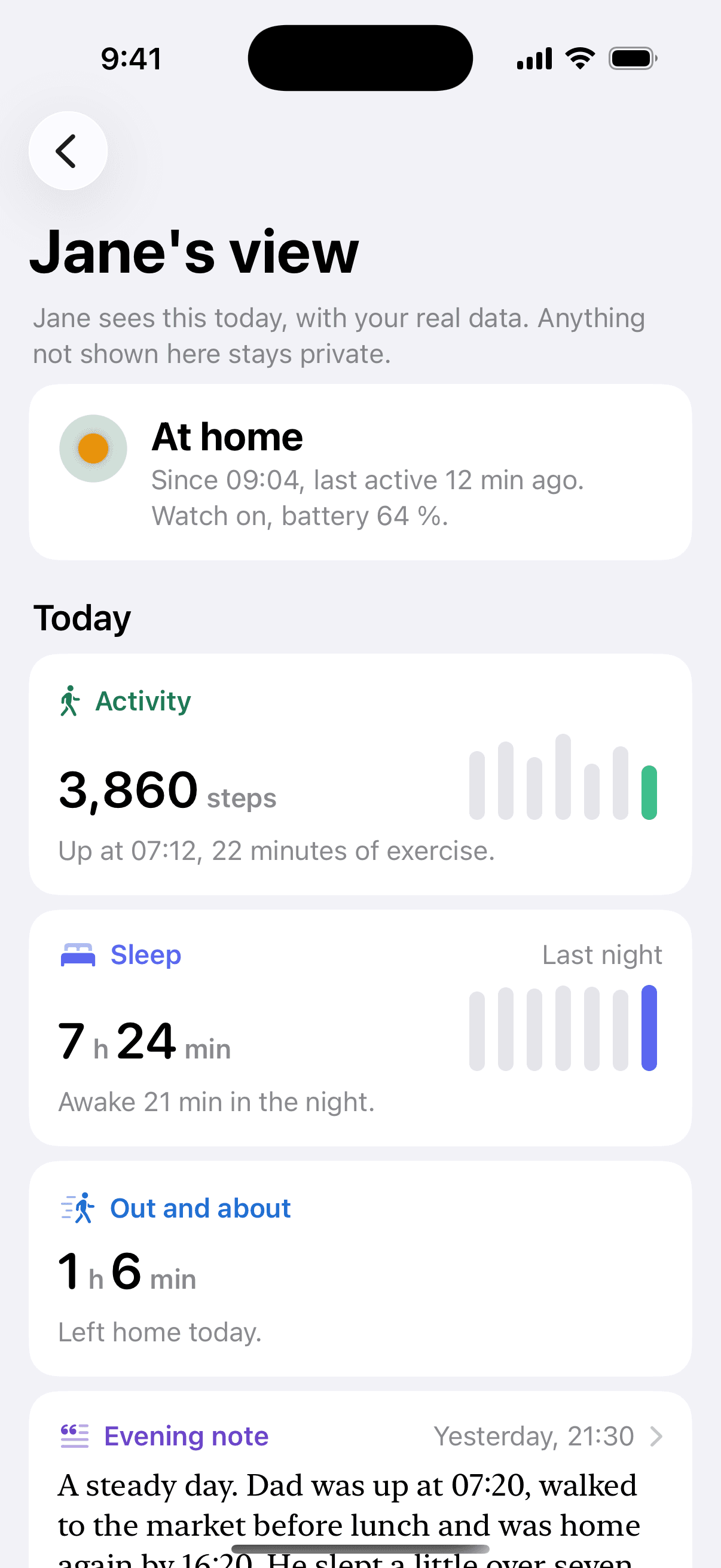
Dad previews what Jane sees
He opens Jane's view with today's real data. Anything that Jane cannot see stays private.
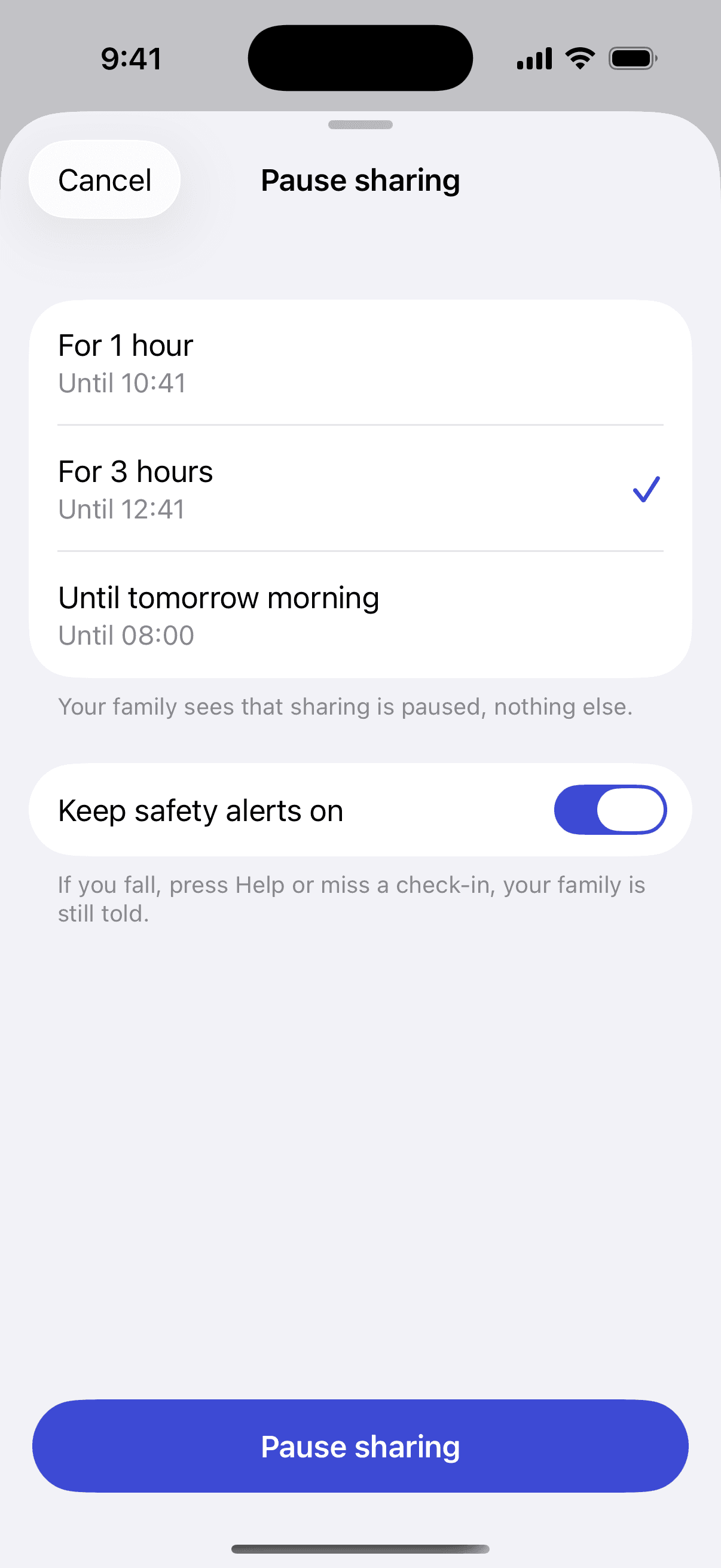
Dad pauses sharing
He pauses sharing for an hour, three hours or until the morning. His safety alerts stay on.
Lasna keeps Dad's raw data on his phone.
Lasna runs every check on Dad's own iPhone. It uploads a short account of his day.
The heart rate samples, motion and location history behind that account stay on his phone.
- 1
His watch
His watch detects falls and heart events. Apple's own safety features keep working as before.
- 2
His iPhone
Lasna learns his routine and runs every check on his phone. It keeps heart rate samples, motion and location history there.
- 3
Lasna's servers
Lasna receives events and a daily summary, such as up at 07:32. It sends each person only what Dad allowed.
- 4
Your phone
You see his day and get alerts within Dad's rules. Dad sees each time you open his day.
Set up Lasna for Dad from wherever you live.
- 1
Create Dad's circle
You create Dad's circle on your own phone and send him a pairing code. It takes about five minutes from any country.
- 2
Dad pairs his watch
Dad opens Lasna and types the code. He chooses who sees what. He never needs a password.
- 3
Invite your siblings
You share one link. Your siblings join the same circle and agree who calls first.
Dad needs an Apple Watch Series 4 or later and an iPhone. You and your siblings can use an iPhone or an Android phone.
Compare Lasna with a pendant alarm and the watch alone.
| Pendant alarm service | Apple Watch on its own | Apple Watch with Lasna | |
|---|---|---|---|
| What he wears | A pendant or wristband | His Apple Watch | His Apple Watch |
| Hard fall detection | On some plans, often for an extra fee | Yes | Yes. The whole family sees the alert |
| Who hears first | A call center | Emergency services, then a text to his emergency contacts | Every family member at once, with who is responding |
| Notices he is not up yet | No | No | Yes, against his own routine |
| Sleep, illness signs, walking | No | On his own watch and phone | Shared with the people he chooses |
| Family abroad | Phone calls | Text messages | Alerts in every time zone and one shared view |
| Cost | About $28 to $65 a month, plus devices | Included with the watch | $19 a month for the family |
Swipe the table sideways to see all three options.
We took pendant prices from the Bay Alarm Medical and MobileHelp pricing pages in November 2026. Apple Watch fall detection calls emergency services when the wearer does not respond. It also texts the emergency contacts in his Medical ID.
Pay one price for the whole family.
Family
For Dad and all of you
Up to 8 family members, about $15.83 a month
- Every safety alert and escalation
- A daily view of his routine
- One shared view for every sibling
- A call order and who is responding
- Different sharing rules for each person
- The weekly note
Care team
For your family and Dad's home care provider
Invite a nurse, a carer or a neighbor. Dad approves their access. Their access ends on a date he sets. We plan to add this plan after launch.
Prices are proposed launch prices. Setting up is free. Your 7-day free trial starts when Dad's watch connects. The person who sets up Lasna pays through the App Store or Google Play.
Check how ready your family is if Dad needs help.
Answer a few short questions about Dad from wherever you live. If he is active, you get a family plan. If he is slowing down, the check adds the CDC's STEADI fall-risk questions.
You get a plain summary to share with your siblings. You do not need an account.
Get answers before you join.
Does my parent need an iPhone?
Yes, for now. Lasna runs on your parent's Apple Watch and iPhone. Family members can use an iPhone or an Android phone.
What if Dad's watch has no cellular plan?
His watch sends most alerts through his iPhone. Away from his phone, the watch sends urgent alerts over a known Wi-Fi network. With no connection at all, Lasna's servers notice the silence and tell you they lost contact.
Does Lasna replace Apple's fall detection or Emergency SOS?
No. Apple Watch still calls emergency services on its own when Dad does not respond after a hard fall. Lasna adds the family. Everyone hears at once and sees who is responding.
Will a stumble or a dropped watch set off an alarm?
No. After a hard fall, his Apple Watch first asks whether he is OK. If he taps I'm OK, the family gets one calm note and nothing escalates. Lasna raises the alarm only when he does not answer, says he fell or presses Help.
Can I set it up for Dad on a visit?
Yes. You create Dad's circle on your own phone and pair his watch while you sit with him. It takes about five minutes. He still chooses what each of you sees, and he can change it later.
What if Dad does not wear his watch every day?
Lasna notices when he leaves the watch off during the day. It reminds him first, then lets you know. Fall detection only works while he wears it, so the daily view shows when the watch is off. Lasna expects him to charge it and sends no alert for that.
Can Lasna call emergency services?
No. Lasna alerts the family, sends texts and places automated calls to the people Dad chose. If nobody responds, Lasna shows everyone the local emergency number and his last known place. Apple Watch itself can call emergency services.
Who can see my parent's data?
Only the people your parent approves can see it. He sets a level for each person. Lasna keeps raw heart rate, motion and location history on his phone. He can pause sharing and see who opened his day.
Is Lasna a medical device?
No. Lasna is a family awareness app. It reports what his watch and phone saw. It does not diagnose or give medical advice.
Join the Lasna waitlist.
We email you to confirm your address, then once more on the day Lasna opens to families.